
Excel Overview
📊 Microsoft Excel – Overview
Beginner → Exam → Interview Ready Guide
Excel Overview gives a big-picture understanding of what Excel is, what it can do, and how it is used in real life, exams, and interviews.
This topic is commonly asked as:
👉 “Explain Excel in brief”
👉 “What are the main features of Excel?”
🔹 PART 1: What is Excel?
1️⃣ What is Microsoft Excel?
Microsoft Excel is a spreadsheet software used to:
✔ Store data
✔ Perform calculations
✔ Analyze information
✔ Create charts & reports
✔ Manage business records
📌 Data in Excel is organized in rows, columns, and cells
2️⃣ Why Excel is Important?
Excel is important because it is:
✔ Easy to learn
✔ Widely used worldwide
✔ Powerful for calculations
✔ Helpful in decision-making
📌 Excel skills are required in almost every job profile
🔹 PART 2: Excel Structure Overview
3️⃣ Excel File Structure
▶ Workbook
An Excel file
Extension:
.xlsxExample:
▶ Worksheet
A single sheet inside a workbook
One workbook can have multiple worksheets
📌 Workbook = File
📌 Worksheet = Sheet
4️⃣ Rows, Columns & Cells
| Element | Description |
|---|---|
| Rows | Horizontal (1, 2, 3…) |
| Columns | Vertical (A, B, C…) |
| Cells | Intersection of row & column |
📌 Example:
5️⃣ Excel Interface (High-Level View)
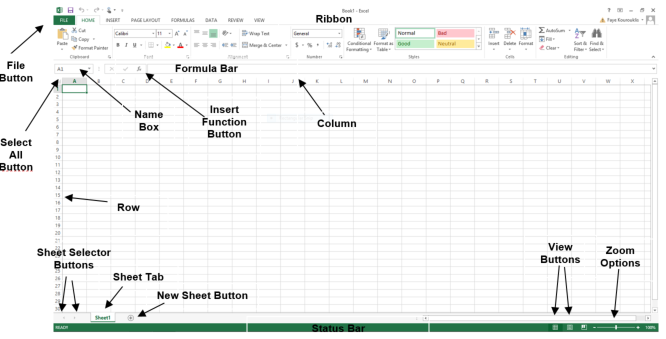
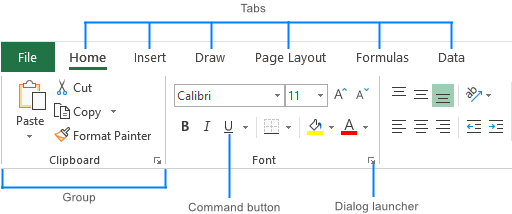
Main components:
✔ Title Bar
✔ Ribbon (Tabs & Commands)
✔ Worksheet Area
✔ Formula Bar
✔ Name Box
✔ Status Bar
📌 Knowing the interface improves speed & confidence
🔹 PART 3: Excel Capabilities
6️⃣ Data Handling in Excel
Excel can handle:
✔ Text (Name, City)
✔ Numbers (Salary, Quantity)
✔ Dates & Time
✔ Currency
✔ Percentage
📌 Excel automatically recognizes data types
7️⃣ Calculations & Formulas
Excel performs calculations using formulas.
📌 All formulas start with =
Examples:
✔ Fast
✔ Accurate
✔ Reliable
8️⃣ Excel Functions
Functions are pre-built formulas.
Common functions:
✔ SUM
✔ AVERAGE
✔ COUNT
✔ MAX
✔ MIN
📌 Functions reduce manual work & errors
9️⃣ Charts & Visualization
Excel helps convert data into charts:
✔ Column Chart
✔ Bar Chart
✔ Line Chart
✔ Pie Chart
📌 Charts make data easy to understand
🔹 PART 4: Where Excel is Used
🔟 Applications of Excel
Excel is used in:
✔ Accounting & Finance
✔ Business & Sales
✔ Education
✔ Data Analysis
✔ Inventory Management
✔ HR & Payroll
✔ Project Tracking
📌 Excel is useful for students and professionals
1️⃣1️⃣ Advantages of Excel
✔ User-friendly
✔ Saves time
✔ Accurate calculations
✔ Supports large data
✔ Powerful analysis tools
1️⃣2️⃣ Limitations of Excel
❌ Not suitable for very large databases
❌ Manual errors possible
❌ Limited automation without VBA
📌 Excel Overview – Interview Questions
Q1. What is Excel?
👉 A spreadsheet software used for data storage, calculation, and analysis
Q2. What is a workbook?
👉 An Excel file
Q3. What is a worksheet?
👉 A single sheet inside a workbook
Q4. What is a cell?
👉 Intersection of a row and column
✅ Final Summary
✔ Excel is spreadsheet software
✔ Data is stored in rows & columns
✔ Workbook contains worksheets
✔ Supports formulas & functions
✔ Used in almost every industry
✔ Important for exams & interviews
