MongoDB Drivers
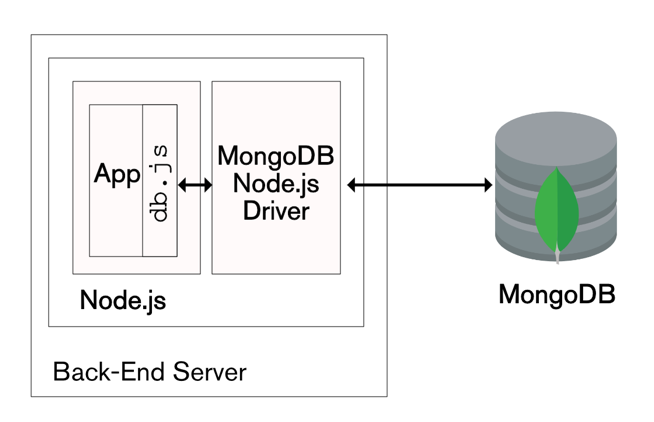
MongoDB Drivers are official libraries that allow applications to connect to, read from, and write to MongoDB using native programming languages.
They handle connections, authentication, CRUD operations, and performance optimizations for you.
Built and maintained by MongoDB, these drivers are the recommended way to use MongoDB in production apps.
What do MongoDB Drivers Do?
Connect your app to MongoDB (local or Atlas)
Perform CRUD & Aggregation
Manage connection pooling
Handle BSON ↔ language objects
Support transactions & retries
Official MongoDB Drivers (Most Used)
| Language | Driver |
|---|---|
| JavaScript | Node.js Driver |
| Python | PyMongo |
| PHP | mongodb |
| Java | MongoDB Java Driver |
| C# | MongoDB .NET Driver |
| Go | mongo-go-driver |
| Ruby | mongo |
📌 Always prefer official drivers.
1️⃣ MongoDB Node.js Driver (Most Popular)
Install
Connect & Insert
2️⃣ MongoDB Python Driver (PyMongo)
Install
Example
3️⃣ MongoDB PHP Driver (Very Common in Web Apps)
Install (Linux)
PHP Example
4️⃣ MongoDB Java Driver (Enterprise Use)
Drivers vs MongoDB Data API
| Drivers | Data API |
|---|---|
| Native language support | REST over HTTPS |
| Best performance | Slightly higher latency |
| Long-running apps | Serverless / Edge |
| Full MongoDB features | Subset + REST |
Connection String (Important)
Atlas:
📌 Store credentials in environment variables.
Best Practices 👍
Reuse MongoClient (don’t reconnect per request)
Use indexes
Enable retryWrites
Close connections on shutdown
Match driver version with MongoDB version
Common Mistakes ❌
Creating a new connection for every query
Hardcoding passwords
Using outdated driver versions
Ignoring connection pooling