
Rust Comments
Rust Comments – Complete Beginner Guide
Comments are one of the most important parts of writing clean, readable Rust code.
They help you:
Explain logic
Document functions
Leave notes for future developers
Improve maintainability
Generate documentation
In this fully beginner guide, you’ll learn:
What comments are in Rust
Types of comments
Single-line comments
Multi-line comments
Documentation comments
Doc comment syntax
When to use comments
Best practices
Common mistakes
Let’s dive in
What Are Comments in Rust?
Comments are lines of text in your code that the Rust compiler ignores.
They are used to:
- Explain what code does
- Improve readability
- Leave reminders
- Generate documentation
Comments do not affect program execution.
Single-Line Comments in Rust
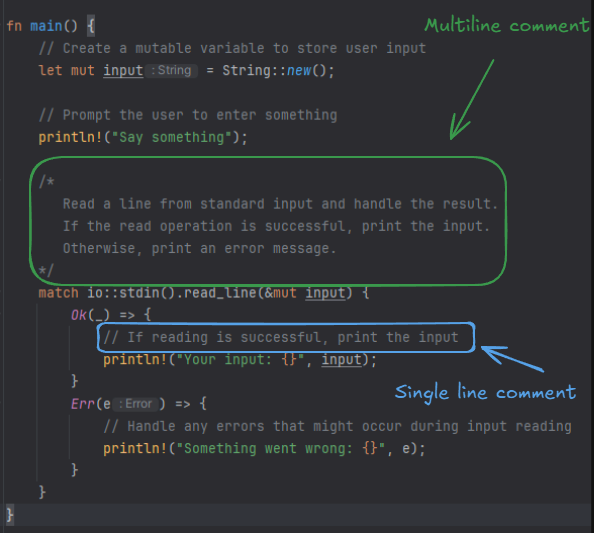
Single-line comments begin with //.
1 2 | // This is a single-line comment let x = 10; // This sets x to 10 |
Everything after // on that line is ignored.
When to Use Single-Line Comments
Use them for:
Short explanations
Inline notes
Quick clarifications
Example:
1 | let speed = 60; // Speed in km/h |
Multi-Line Comments in Rust
Multi-line comments begin with /* and end with */.
1 2 3 4 5 | /* This is a multi-line comment It can span multiple lines */ let y = 20; |
Useful for:
Longer explanations
Temporarily disabling code
Nested Multi-Line Comments (Rust Feature)
Rust supports nested block comments.
1 2 3 4 5 6 | /* Outer comment /* Inner comment */ */ |
Many languages do NOT support this — Rust does.
Visual Overview of Rust Comment Types
Documentation Comments in Rust
Rust has special comments used to generate documentation.
These are called doc comments.
There are two types:
Outer doc comments
Inner doc comments
Outer Documentation Comments (///)
Used to document items like:
Functions
Structs
Enums
Modules
Example:
1 2 3 4 | /// Adds two numbers together fn add(a: i32, b: i32) -> i32 { a + b } |
These comments appear in generated documentation.
Inner Documentation Comments (//!)
Used inside modules.
Example:
1 | //! This module handles user authentication |
Generating Documentation with Cargo
Rust has built-in documentation tool.
Run:
This generates HTML documentation from your doc comments.
Very powerful feature.
Writing Good Documentation Comments
Example of detailed doc comment:
1 2 3 4 5 6 7 8 9 10 11 12 | /// Calculates the square of a number. /// /// # Arguments /// /// * `x` - The number to square. /// /// # Returns /// /// The square of `x`. fn square(x: i32) -> i32 { x * x } |
This creates professional-level documentation.
Markdown in Doc Comments
Rust documentation supports Markdown.
Example:
1 2 3 4 5 6 7 | /// **Bold text** /// *Italic text* /// /// # Example /// ``` /// let result = square(5); /// ``` |
Rust doc comments can include:
Code blocks
Lists
Headings
Links
Commenting Out Code
Sometimes you want to temporarily disable code:
1 | // println!("Debug message"); |
Or:
1 2 3 4 | /* let x = 5; println!("{}", x); */ |
Useful during debugging.
Why Comments Matter in Rust
Rust is strict and powerful.
Comments help explain:
Ownership logic
Borrowing rules
Complex pattern matching
Unsafe code blocks
Concurrency behavior
Good comments reduce confusion.
When NOT to Use Comments
Avoid commenting obvious code.
Bad example:
1 | let x = 5; // Assign 5 to x |
Instead, use clear variable names.
Comments vs Clean Code
Better approach:
Instead of:
1 2 | // Calculate total price including tax let total = price + (price * 0.18); |
Write:
1 | let total_with_tax = price + (price * 0.18); |
Readable code reduces need for comments.
Comments in Structs and Enums
Example:
1 2 3 4 5 6 7 8 | /// Represents a user account struct User { /// User's name name: String, /// User's age age: u32, } |
Documentation becomes clean and professional.
Comments in Modules
1 2 3 4 5 6 7 | //! This module contains math utilities mod math { /// Adds two numbers pub fn add(a: i32, b: i32) -> i32 { a + b } } |
Common Beginner Mistakes
- Over-commenting obvious code
- Writing outdated comments
- Not using doc comments for public APIs
- Forgetting to update comments
- Writing misleading explanations
Best Practices for Rust Comments
- Use comments to explain why, not what
- Use doc comments for public functions
- Keep comments concise
- Use Markdown formatting
- Avoid unnecessary comments
Real-World Example
1 2 3 4 5 6 7 8 9 10 11 12 | /// Calculates compound interest. /// /// # Arguments /// * `principal` - Initial amount /// * `rate` - Interest rate /// * `years` - Number of years /// /// # Returns /// Total amount after interest fn compound_interest(principal: f64, rate: f64, years: u32) -> f64 { principal * (1.0 + rate).powi(years as i32) } |
Professional documentation style.
Comments and Team Collaboration
In large projects:
Comments improve maintainability
Help onboard new developers
Explain complex algorithms
Document unsafe blocks
Especially important in Rust due to advanced concepts.
Frequently Asked Questions (FAQs)
1. What are comments in Rust?
Comments are lines of text ignored by the compiler and used to explain code.
2. How do you write a single-line comment in Rust?
Use // before the comment text.
3. What are documentation comment in Rust?
Documentation comments use /// or //! and generate documentation using cargo doc.
4. Does Rust support multi-line comment?
Yes, using /* */. Rust even supports nested block comments.
5. Should I comment every line of Rust code?
No. Write clear code and use comments only when necessary.
Conclusion
Rust comment are:
Simple
Powerful
Documentation-friendly
Markdown-supported
You learned:
Single-line comments
Multi-line comments
Doc comments
Markdown formatting
Best practices
Writing good comments improves code quality and makes your Rust projects professional and maintainable.
