
Rust Functions
Rust Functions – Complete Beginner Guide
Functions are the building blocks of every Rust program.
They allow you to:
Organize code
Reuse logic
Improve readability
Control ownership and borrowing
Build modular applications
In this fully beginner guide, you’ll learn:
What functions are in Rust
How to define and call functions
Parameters and arguments
Return values
Expression vs statement
Ownership and borrowing in functions
Advanced function features
Best practices
Let’s dive in
What Is a Function in Rust?
A function is a block of reusable code that performs a specific task.
In Rust, functions are defined using the fn keyword.
Basic example:
1 2 3 | fn main() { println!("Hello, Rust!"); } |
Here:
fndefines a functionmain()is the entry point of every Rust program
Basic Function Syntax
1 2 3 | fn function_name() { // code here } |
Example:
1 2 3 | fn greet() { println!("Welcome to Rust!"); } |
Calling it:
1 2 3 | fn main() { greet(); } |
Function Parameters in Rust
Functions can take input values called parameters.
1 2 3 4 5 6 7 | fn greet(name: &str) { println!("Hello, {}", name); } fn main() { greet("Alice"); } |
Important:
Rust requires you to specify parameter types.
Multiple Parameters
1 2 3 | fn add(a: i32, b: i32) { println!("Sum: {}", a + b); } |
Rust enforces type safety strictly.
Returning Values from Functions
In Rust, you must specify the return type using ->.
1 2 3 | fn add(a: i32, b: i32) -> i32 { a + b } |
Notice:
No
returnkeyword neededNo semicolon at the end
Rust returns the last expression.
Expression vs Statement (Very Important)
In Rust:
Expressions return values
Statements do not
Correct:
1 2 3 | fn square(x: i32) -> i32 { x * x } |
Wrong:
1 2 3 | fn square(x: i32) -> i32 { x * x; // ❌ semicolon makes it a statement } |
Semicolons change behavior.
Using return Keyword
You can also write:
1 2 3 | fn multiply(a: i32, b: i32) -> i32 { return a * b; } |
But idiomatic Rust prefers expression style.
Visual Flow of Function Execution
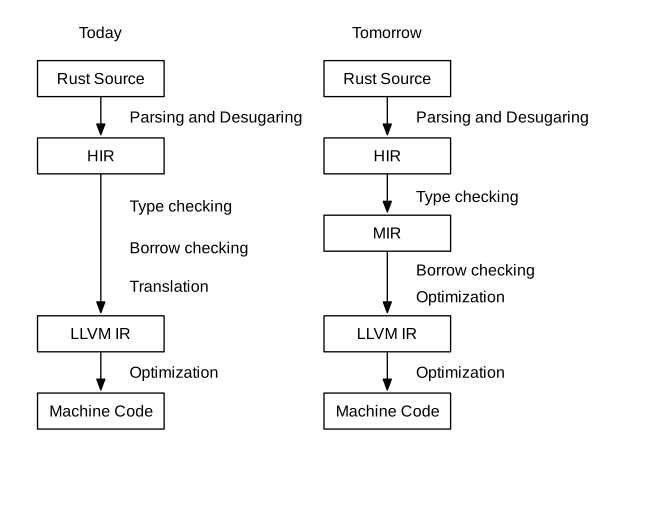
Functions execute:
Parameters received
Code runs
Value returned
Ownership in Functions
Functions follow ownership rules.
Example:
1 2 3 4 5 6 7 8 9 | fn takes_ownership(s: String) { println!("{}", s); } fn main() { let s = String::from("Rust"); takes_ownership(s); // println!("{}", s); moved } |
Ownership moved into function.
Borrowing in Functions
To avoid moving ownership:
1 2 3 | fn print_length(s: &String) { println!("{}", s.len()); } |
Now original value remains usable.
Best practice: use &str instead of &String.
Mutable References in Functions
1 2 3 4 5 6 7 8 | fn change(s: &mut String) { s.push_str(" Language"); } fn main() { let mut s = String::from("Rust"); change(&mut s); } |
- Allows modification
- Only one mutable reference allowed
Functions and Scope
Variables created inside functions:
Exist only inside that function
Are dropped when function ends
1 2 3 | fn example() { let x = 10; } |
x is not accessible outside.
Functions with Conditional Returns
1 2 3 4 5 6 7 | fn check_even(num: i32) -> bool { if num % 2 == 0 { true } else { false } } |
Better version:
1 2 3 | fn check_even(num: i32) -> bool { num % 2 == 0 } |
Rust encourages concise expressions.
Returning Multiple Values (Using Tuples)
1 2 3 4 5 6 7 | fn calculate(a: i32, b: i32) -> (i32, i32) { (a + b, a * b) } fn main() { let (sum, product) = calculate(4, 5); } |
Rust does not support multiple return values directly, but tuples solve this.
Function Pointers
You can assign functions to variables.
1 2 3 4 5 6 7 8 | fn add(a: i32, b: i32) -> i32 { a + b } fn main() { let operation = add; println!("{}", operation(2, 3)); } |
Closures (Short Functions)
Closure are anonymous functions.
1 2 | let add = |a: i32, b: i32| a + b; println!("{}", add(3, 4)); |
Closures are powerful in Rust.
Inline Functions
Rust does not guarantee inlining, but you can suggest:
1 2 3 4 | #[inline] fn fast_function() { println!("Fast!"); } |
Used for performance optimization.
Associated Functions (Methods)
Functions inside impl blocks:
1 2 3 4 5 6 7 8 9 10 | struct Rectangle { width: u32, height: u32, } impl Rectangle { fn area(&self) -> u32 { self.width * self.height } } |
Called using:
1 | rect.area(); |
Main Function Special Rules
Must be named
mainNo parameters
Can return
Result
Example:
1 2 3 | fn main() -> Result<(), String> { Ok(()) } |
Useful for error handling.
Common Beginner Mistakes
- Forgetting return type
- Adding semicolon at end of return expression
- Moving ownership unintentionally
- Forgetting parameter types
- Confusing functions and closures
Best Practices
- Prefer expression-style returns
- Use borrowing instead of moving when possible
- Keep functions small and focused
- Use descriptive names
- Use
&strfor string parameters
Frequently Asked Questions (FAQs)
1. What is a function in Rust?
A function is a reusable block of code defined using the fn keyword.
2. How do you return a value in Rust?
You specify return type using -> and return the final expression without a semicolon.
3. Does Rust require type annotations in functions?
Yes. Parameter and return types must be explicitly declared.
4. What happens to variables inside a function?
They go out of scope and are dropped when the function ends.
5. What is the difference between a function and a closure?
Functions are defined using fn. Closures are anonymous and can capture variables from their environment.
Conclusion
Rust functions are:
Strictly typed
Expression-based
Ownership-aware
Memory safe
Understanding functions helps you master:
Ownership
Borrowing
Scope
Modular design
Once you’re comfortable with Rust functions, writing structured programs becomes much easier.
