
Rust Strings
Rust Strings – Complete Beginner Guide
Strings in Rust are powerful but slightly different from other languages.
Rust provides two main string types:
String(heap-allocated, growable)&str(string slice, borrowed reference)
Understanding the difference is essential for mastering Rust.
In this guide, you’ll learn:
What
Stringand&strareStack vs heap memory
Creating and modifying strings
String slices
Common string methods
UTF-8 handling
Best practices
Let’s dive in
Two Types of Strings in Rust
| Type | Description | Stored |
|---|---|---|
String | Growable, owned string | Heap |
&str | Borrowed string slice | Stack reference |
What Is &str?
&str is a string slice (reference to a string).
Example:
1 | let s = "Hello"; |
This is:
A string literal
Stored in binary
Immutable
Type:
&'static str
What Is String?
String is:
Owned
Heap allocated
Growable
Mutable (if declared
mut)
Example:
1 2 | let mut s = String::from("Hello"); s.push_str(" Rust"); |
Visual: Stack vs Heap
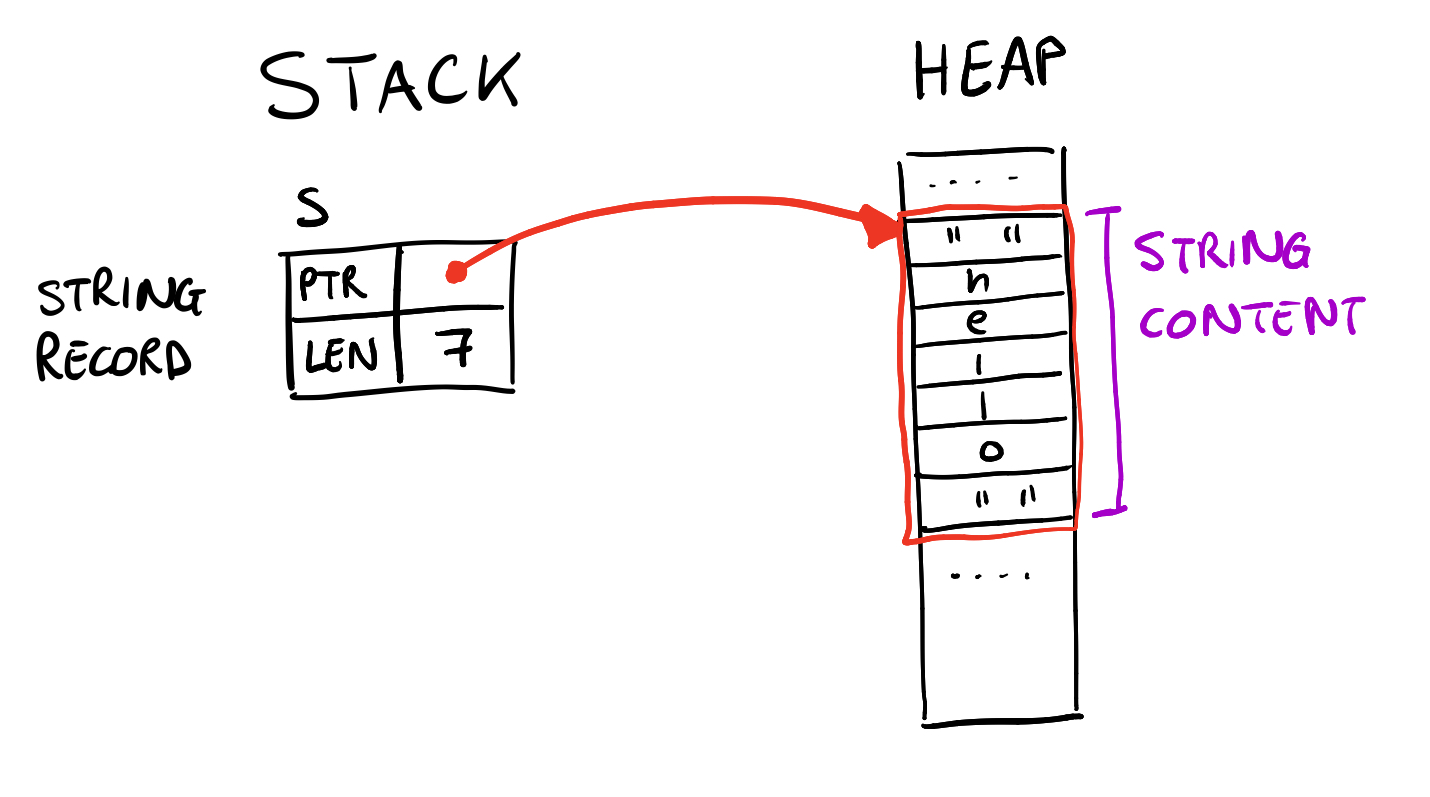
String contains:
Pointer
Length
Capacity
Data stored in heap.
Creating Strings
From literal
1 | let s = String::from("Hello"); |
Using to_string()
1 | let s = "Hello".to_string(); |
String vs &str Conversion
String → &str
1 2 | let s = String::from("Hello"); let slice = &s; |
&str → String
1 2 | let s = "Hello"; let owned = s.to_string(); |
Modifying Strings
Only String can be modified.
1 2 3 | let mut s = String::from("Hello"); s.push('!'); s.push_str(" Rust"); |
String Concatenation
Using +
1 2 3 4 | let s1 = String::from("Hello "); let s2 = String::from("World"); let s3 = s1 + &s2; |
s1is moved here.
Using format! (Recommended)
1 2 3 4 | let s1 = "Hello"; let s2 = "World"; let result = format!("{} {}", s1, s2); |
- Does not move values
- Cleaner syntax
String Slicing
1 2 | let s = String::from("Hello Rust"); let slice = &s[0..5]; |
But careful:
Rust strings are UTF-8 encoded.
Indexing is byte-based, not character-based.
UTF-8 in Rust Strings
Rust strings store UTF-8 data.
Example:
1 | let s = "नमस्ते"; |
Each character may use multiple bytes.
You cannot index directly:
1 | s[0]; // Not allowed |
Instead use:
1 2 3 | for c in s.chars() { println!("{}", c); } |
Iterating Over Strings
Characters
1 2 3 | for c in "Hello".chars() { println!("{}", c); } |
Bytes
1 2 3 | for b in "Hello".bytes() { println!("{}", b); } |
Common String Methods
| Method | Description |
|---|---|
len() | Length in bytes |
push() | Add character |
push_str() | Add string |
replace() | Replace text |
trim() | Remove whitespace |
contains() | Check substring |
split() | Split string |
Example:
1 2 | let s = "Hello Rust"; println!("{}", s.contains("Rust")); |
Ownership with Strings
Passing String to function moves ownership:
1 2 3 | fn takes(s: String) { println!("{}", s); } |
Better approach:
1 2 3 | fn takes(s: &str) { println!("{}", s); } |
Use &str when possible.
Common Beginner Mistakes
- Confusing
Stringand&str Trying to index string directly- Forgetting ownership moves
- Using
+without understanding move - Ignoring UTF-8
Best Practices
- Use
&strfor function parameters - Use
format!for concatenation - Prefer borrowing over cloning
- Understand UTF-8 indexing
- Keep string scopes small
Frequently Asked Questions (FAQs)
1. What is the difference between String and &str in Rust?
String is owned and heap-allocated.&str is a borrowed string slice.
2. Why can’t I index a Rust string?
Because Rust strings are UTF-8 encoded, and characters may use multiple bytes.
3. How do I convert &str to String?
Use .to_string() or String::from().
4. How do I concatenate strings safely?
Use the format! macro.
5. Is String mutable by default?
No. You must declare it with mut.
Conclusion
Rust strings are powerful but require understanding:
Ownership
Borrowing
UTF-8 encoding
Heap vs stack
Once you master String and &str, Rust becomes much easier to work with.
