
Rust while Loops
Rust while Loop – Complete Beginner Guide
Loops are fundamental in programming, and Rust provides several ways to repeat code. While the for loop is commonly preferred, the while loop is powerful when you need condition-based repetition.
In this fully beginner guide, you’ll learn:
What a
whileloop is in RustBasic syntax and examples
Infinite loops with
loopLoop control (
break,continue)Ownership considerations
Common mistakes
Best practices
Let’s dive in
What Is a while Loop in Rust?
A while loop repeatedly executes code as long as a condition is true.
Basic syntax:
1 2 3 | while condition { // code runs while condition is true } |
Unlike Rust’s for loop (which works with iterators), the while loop depends on a Boolean condition.
Basic Example – Counting with While
1 2 3 4 5 6 7 8 | fn main() { let mut count = 1; while count <= 5 { println!("{}", count); count += 1; } } |
Output:
2
3
4
5
Important:
Condition is checked before each iteration
Loop stops when condition becomes false
How while Loop Works Internally
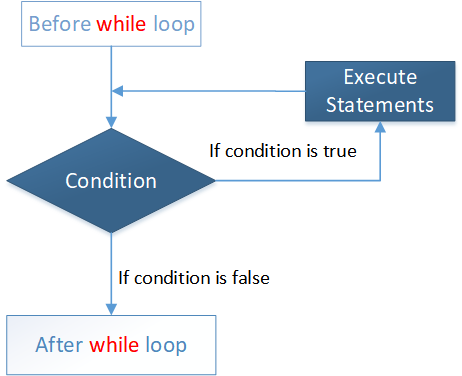
Execution flow:
Check condition
If true → execute block
Return to condition
Repeat
Infinite While Loop
If the condition never becomes false:
1 2 3 4 5 | fn main() { while true { println!("Running..."); } } |
- This runs forever unless stopped.
Rust provides a better infinite loop syntax:
1 2 3 | loop { println!("Infinite loop"); } |
The loop keyword is more idiomatic for infinite loops.
Breaking Out of a Loop
Use break to exit early.
1 2 3 4 5 6 7 8 9 10 11 | fn main() { let mut num = 1; while num <= 10 { if num == 5 { break; } println!("{}", num); num += 1; } } |
Loop stops at 5.
Skipping Iterations with continue
1 2 3 4 5 6 7 8 9 10 11 12 13 | fn main() { let mut num = 0; while num < 5 { num += 1; if num == 3 { continue; } println!("{}", num); } } |
continue skips current iteration.
While vs Loop in Rust
| Feature | while | loop |
|---|---|---|
| Condition-based | Yes | No |
| Infinite by default | No | Yes |
| Returns value | No | Yes |
| Common usage | Conditional repetition | Infinite or complex loops |
Returning Values from loop (Not While)
The loop keyword can return values:
1 2 3 4 5 6 7 8 9 10 11 12 13 | fn main() { let mut counter = 0; let result = loop { counter += 1; if counter == 5 { break counter * 2; } }; println!("{}", result); } |
Output:
while cannot return values directly.
While Loop with Ownership
Ownership rules apply inside loops.
Example:
1 2 3 4 5 6 | let s = String::from("Rust"); while true { println!("{}", s); break; } |
This works because ownership is not moved.
But:
1 2 3 4 5 6 | let s = String::from("Rust"); while true { let t = s; break; } |
Here:
Ownership moves
sbecomes invalid
Loops do not bypass ownership rules.
While Loop and Mutable Variables
Since condition must change, variables are often mut.
1 2 3 4 5 6 | let mut x = 10; while x > 0 { println!("{}", x); x -= 1; } |
If you forget mut, Rust gives compile-time error.
Using While with Collections
You can manually loop through array using index:
1 2 3 4 5 6 7 | let numbers = [10, 20, 30]; let mut index = 0; while index < numbers.len() { println!("{}", numbers[index]); index += 1; } |
But this is less safe than using for.
Rust recommends for for iterating collections.
When Should You Use While?
Use while when:
You don’t know number of iterations
Loop depends on dynamic condition
You need manual control
Examples:
User input validation
Game loops
Waiting for event
Example – Guessing Game Pattern
1 2 3 4 5 6 | let mut guess = 0; while guess != 7 { guess += 1; println!("Guessing..."); } |
Loop runs until condition satisfied.
Nested While Loops
1 2 3 4 5 6 7 8 9 10 11 12 | let mut i = 1; while i <= 3 { let mut j = 1; while j <= 3 { println!("{} {}", i, j); j += 1; } i += 1; } |
Used in:
Matrix operations
Pattern printing
Common Beginner Mistakes
- Forgetting to update condition variable
- Creating infinite loops unintentionally
- Forgetting
mutkeyword - Using while instead of for unnecessarily
- Moving ownership accidentally inside loop
While vs For Loop in Rust
Rust prefers for when:
Iterating over ranges
Iterating collections
Working with iterators
Use while when:
Condition-based repetition
Manual control needed
Safety in Rust While Loops
Rust ensures:
No data races
No invalid memory access
Ownership rules enforced
Even inside loops, Rust maintains memory safety.
Best Practices
- Use
forfor iteration - Use
whilefor condition-based loops - Always ensure condition changes
- Keep loops readable
- Avoid complex nested loops
Real-World Example – Countdown Timer
1 2 3 4 5 6 7 8 | let mut seconds = 5; while seconds > 0 { println!("{} seconds left", seconds); seconds -= 1; } println!("Time's up!"); |
Clean and predictable.
Frequently Asked Questions (FAQs)
1. What is a while loop in Rust?
A while loop repeats code as long as a Boolean condition remains true.
2. What is the difference between while and loop?
while depends on a condition.loop runs infinitely unless stopped.
3. Can a while loop return a value?
No. Only loop can return a value using break.
4. When should I use while instead of for?
Use while when repetition depends on a dynamic condition.
5. Can while loops cause infinite loops?
Yes, if the condition never becomes false.
Conclusion
Rust’s while loop is:
Simple
Condition-based
Safe
Ownership-aware
You learned:
Basic syntax
Infinite loops
Break and continue
Ownership inside loops
When to use while
Mastering loops is essential for writing real-world Rust programs.
