SQL JOINs

Here is a clear, complete, and practical guide to SQL JOINs, including diagrams, examples, and best-practice notes.
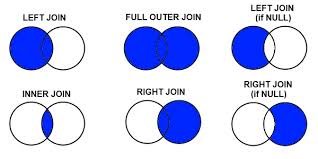
What Are SQL JOINs?
SQL JOINs combine rows from two or more tables based on a related column, usually a foreign key.
JOINs are used to answer relational questions such as:
Which orders belong to which user?
Which products are in which categories?
What rows in one table have no match in another?
1. INNER JOIN
Returns only the rows with matching values in both tables.
- Shows users who have placed orders.
- Users without orders are excluded.
2. LEFT JOIN (LEFT OUTER JOIN)
Returns all rows from the left table, plus matching rows from the right table.
Rows without a match on the right become NULL.
- Shows all users, even those with no orders.
3. RIGHT JOIN (RIGHT OUTER JOIN)
Opposite of LEFT JOIN:
Returns all rows from the right table, and matching rows from the left.
- Shows all orders, even if the user is missing or deleted.
(Not available in SQLite.)
4. FULL OUTER JOIN
Returns all rows from both tables, matching when possible.
Unmatched rows get NULLs.
Users with orders
Users without orders
Orders without users
(Not natively supported in MySQL—requires UNION workaround.)
5. CROSS JOIN
Returns every combination of rows (Cartesian product).
Can create a huge number of rows.
6. SELF JOIN
A table joined to itself—used for hierarchical or relational data within the same table.
Practical Examples
Get users with their latest order
Find users who have never placed an order
Count orders per user
Best Practices for JOINs
- Always use table aliases for readability
- Always JOIN on indexed columns for performance
- Prefer INNER JOIN when appropriate—it is faster
- Use LEFT JOIN to find unmatched rows (common analytics task)
- Avoid FULL JOIN on large datasets (expensive)
- Don’t put JOIN conditions in the
WHEREclause—useON